Some days ago, I got annoyed with that, everyone couldn’t pick up my iPhone and start messing with Voice Control. And because I never use (or will use) this feature, I took journey to turn it off, ones and for all.
Google gave me some hints about daemons running in background, responsible for Voice Control interactions. With that knowledge in my head, I started moving them into backup folder:
If you want something to work as it should, write it yourselft. Commentcloud - Hides Soundcloud.com comments by default, after page is loaded (hate those things!). Should work on Firefox, Google Chrome, Opera.
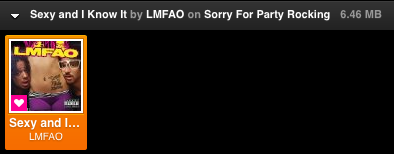
This is my latest, handy weekend project for Grooveshark - Bytingshark. The main goal of it was to be able easily see playing songs mp3 file size. From that you can assume files sound quality and that just what doctor prescribed.
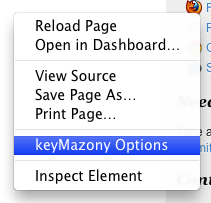
Today I noticed that keyMazony was broken, that because Amazon changed some JavaScript code inside Cloud Player, so rewrite for toggles was needed. Most of them I managed to save, but “Mute” functionality was missing from Cloud Player. Amazon deleted it entirely? Because of that, I removed “Mute” functionality from keyMazony for now, but will see how things turn out. Grab extension for your browser here (if it isn’t already updated itself).
Love new Amazon Cloud Player, but want better keyboard shortcut experience with it. Well, keyMazony is want you need. It adds customizable keyboard shortcut feature to Amazon Cloud Player. Forked from keySharky it works in Firefox, Prism, Google Chrome and Safari. It’s best tool for this kind of job :)
While playing with Windows 7, I had no other choose as to put up solution for missing global keyboard shortcuts in Grooveshark player (who sits inside Firefox or Prism, because that’s a way I roll), similar to solution in Ubuntu. Luckily it’s (kinda) easy to achieve, so here we gooo!
First of all, we will need some software to begin with: Wget for Windows (grab “Complete package, except sources” download or if you are lost, here is direct link to 1.11.4 version) and AutoHotkey. Install both of them.
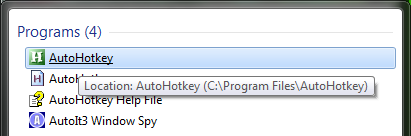
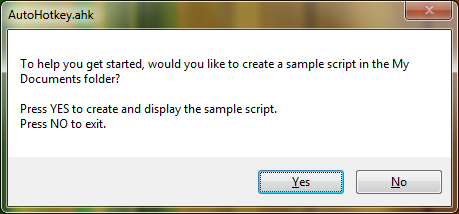
Now open AutoHotkey (located in your Program Files or where ever did you install it). It should ask if you would like to create a sample script in My Documents folder (if that file doesn’t exist yet). What are you waiting for? Yes, of course! Great now when AutoHotkey sample script pop-up on screen wipe it clean.
Now some magic. To create new keyboard shortcut for Grooveshark player using keySharky API, just add a line that goes something like this:
In place of HOTKEY you could write ^H which when translated into keyboard shortcut would assign CTRL + H combo. Other basic modifier keys are #Windows key, !Alt and +Shift. For more, check out AutoHotkey documentation on that subject.
For this example, I will use ^!+Z as CTRL + ALT + SHIFT + Z.
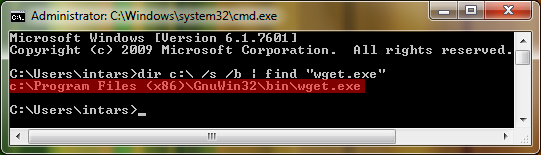
Next in line: WGET_EXE you must replace with wget.exe binary location path. By default in Windows 7 (64-bit), Wget installs in “C:\Program Files (x86)\GnuWin32\bin\wget.exe”. But if you aren’t sure where did you install it in your machine, you can search for it by doing Start (Orb) > Run > cmd (or just search for cmd). When in command line execute this command. What it does is, tries to find wget.exe in your C:\ drive and return its full path.
1
dir c:\ /s /b | find "wget.exe"
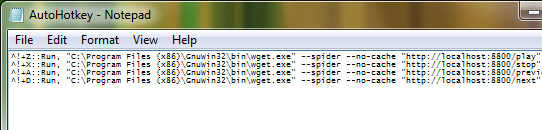
Last on list is KEYSHARKY_API, but how to setup/use it you can (and should) read here. When done, it should look something like this: